A deadline usually makes people notice their printing setup. The trade show booth is booked, the bid package has to go out, the legal filing needs exact copies in the right order, or the branch office needs manuals by morning. That's when a lot of businesses learn the hard way that an office printer is fine for drafts, but it isn't built for production.
Professional business document printing services are less like hitting “print” and more like hiring a caterer for an important event. You can cook for ten people in your kitchen. Feeding two hundred guests on time, with consistent quality and no chaos, takes a different system. Printing works the same way. The machine matters, but value is found in the workflow behind it: file prep, proofing, stock selection, finishing, packing, delivery, and, when needed, secure handling.
That distinction matters more now than it used to. Buyers aren't just ordering pages. They're buying reliability, version control, readable output, brand consistency, and a process that doesn't eat staff time.
If you're comparing providers, the smartest question isn't “What's your price per page?” It's “Can you help us move this document from draft to finished piece without errors, delays, or unnecessary labor?” That's the difference between a vendor and a print partner.
Introduction
Most businesses come to print under pressure. A marketing team needs brochures before an event. A contractor needs plan sets and spec books for a bid. A law office needs exhibits copied, organized, and delivered without a page out of place. In each case, the printed piece looks simple from the outside. Inside the workflow, there are dozens of ways the job can go wrong.
That's why business document printing services deserve more respect than they usually get. They aren't just a convenience for companies that don't own better equipment. They're a way to protect deadlines, keep documents readable and consistent, and avoid turning your staff into an amateur production department.
A desktop printer handles the easy part. A professional shop handles the hard parts that people notice only when they fail: color drift, missing pages, crooked trims, wrong paper, bad file setup, weak binding, poor packaging, and late delivery. Those aren't cosmetic problems. They affect how your brand looks, how your team works, and in some industries, whether a document is usable at all.
Practical rule: If the document affects revenue, compliance, a submission deadline, or a client impression, treat printing like an operations decision, not a supply purchase.
The best results usually come from clients who know what they need the piece to do. Does it need to persuade, hold up to handling, scan cleanly, fit in a binder, mail efficiently, or remain easy to annotate? Once you think in those terms, the print specs start making sense. Paper, format, finishing, and delivery stop feeling technical and start feeling practical.
What Are Business Document Printing Services
Business document printing services are outsourced production support for the documents your company can't afford to print casually. That includes things like proposals, manuals, court packets, training guides, presentations, spec books, plan sets, branded collateral, scanned archives, and recurring internal documents.
The easiest way to think about it is the catering analogy. In-house printing is your office kitchen. It works for small batches and last-minute basics. A professional print provider is the catering crew. They bring larger equipment, better process control, more material options, and a team that knows how to produce the same result over and over without improvising at the last minute.
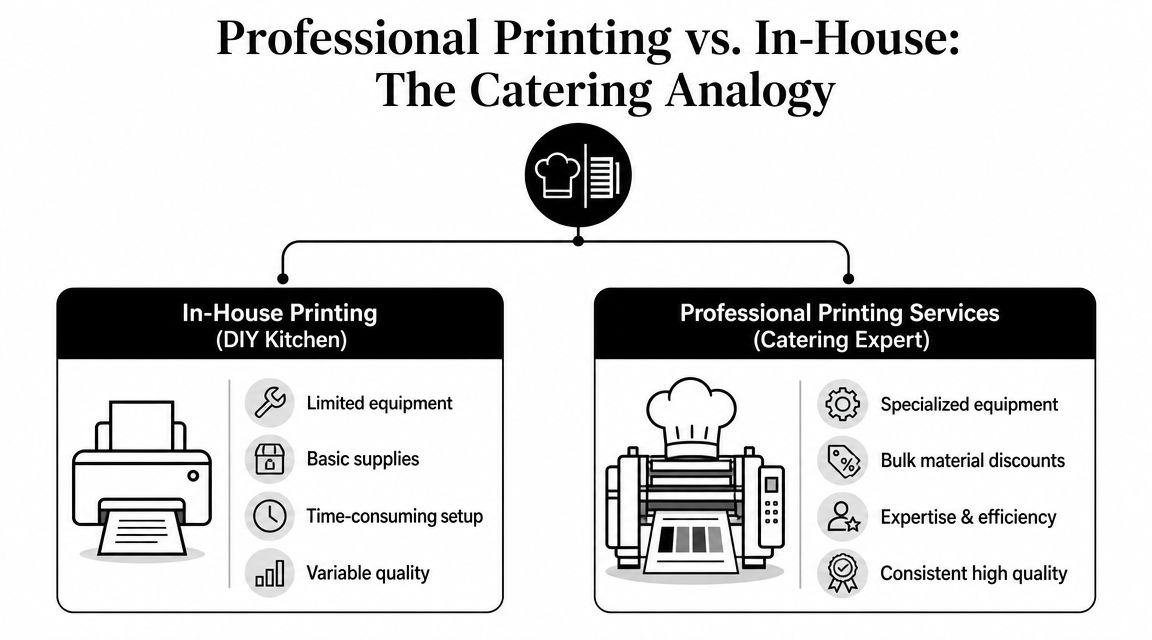
What a provider actually adds
A serious print shop isn't selling toner. It's adding capacity your office doesn't have.
- Production equipment: Faster digital presses, larger-format devices, finishing tools, and scanning systems handle jobs that stall on office machines.
- Prepress review: Files get checked before paper is wasted. That catches problems like low-resolution images, bad bleeds, wrong page size, missing fonts, and pagination errors.
- Finishing options: Folding, binding, cutting, laminating, tabbing, collating, and packaging turn a stack of sheets into something usable.
- Workflow support: A good provider can receive digital files, print from hard copy, convert documents, and route final materials where they need to go.
Why specialized providers matter more now
The broad print market hasn't vanished, but generic volume printing has thinned out. The U.S. Printing Services industry is estimated at $2.4 billion in 2026, with 649 businesses remaining after a 22.9% CAGR decline in business count from 2021 to 2026, according to IBISWorld's U.S. Printing Services industry data. That tells me something practical. The shops still standing usually aren't winning on “cheap copies for everybody.” They're winning on speed, reliability, and niche work that businesses still need done right.
That's why business document printing services now sit closer to operations support than to a retail copy counter. If your jobs involve legal sets, AEC documents, branded kits, mailers, or scanning and conversion, you want a provider built for exceptions and deadlines, not just everyday walk-in traffic.
Common service categories
Not every job belongs on the same machine or follows the same path. Most business print work falls into a few buckets:
- Digital document printing: Best for short runs, fast turns, and jobs that change often.
- Offset printing: Better suited to larger runs where setup time is worth the consistency.
- Large format printing: Used for plans, posters, signs, displays, and oversized visuals.
- Document finishing and distribution: The stage that often determines whether the printed piece is useful.
A print partner should feel like an extension of your team. If they only ask “how many copies,” they're probably thinking too small.
Decoding the Different Types of Printing Services
A lot of buying mistakes happen because people choose a print method by habit instead of by use case. They ask for the cheapest option, then expect premium results. Or they order premium specs for a document that only needed to be clear, fast, and easy to update.
The better approach is to match the method to the job.
Digital printing for speed and flexibility
Digital printing is the workhorse for many business documents. It's usually the right fit when you need short runs, quick updates, multiple versions, or a fast turnaround. Proposals, sales sheets, training packets, meeting books, and event handouts often live here.
If you revise content frequently, digital wins because it doesn't punish small quantities. You can update a cover, swap pages, or print a limited run without being stuck with outdated inventory. For many businesses, that flexibility matters more than chasing the lowest unit cost.
Offset printing for longer runs
Offset printing makes more sense when the piece is stable and the quantity is high enough to justify the setup. If you're printing a large run of brochures, forms, or branded materials with no expected revisions, offset can be the smarter production choice.
The trap is using offset for materials that change every few weeks. A lower cost per piece doesn't help if you throw half the run away after a policy update or a pricing change.
Large format and finishing for operational documents
Large format printing covers plan sets, presentation boards, posters, signage, and display graphics. In business settings, this often matters most for AEC firms, facilities teams, trade show staff, and in-store communication.
Finishing is where a document becomes usable. Standard workflows often center on 8.5 x 11-inch output, and choices like duplex or single-sided printing affect more than paper use. Printleaf's overview of document printing workflows notes that duplex printing helps reduce bulk, while single-sided printing is often better for annotation and review. That lines up with real shop practice. A training manual might benefit from duplex to keep the binder thinner. A legal review packet might need single-sided pages so people can mark it up and resequence sections quickly.
If the document will be handled, marked up, filed, mailed, or presented, the finishing decision matters almost as much as the print itself.
Choosing the right printing service
| Service Type | Ideal For | Best Quantity | Example Use Case |
|---|
| Digital Printing | Fast-turn documents, changing content, short-run collateral | Short to medium runs | Sales presentations, manuals, updated proposals |
| Offset Printing | Stable designs and repeated high-volume jobs | Medium to large runs | Brochures, branded forms, recurring inserts |
| Large Format Printing | Oversized visuals and technical documents | Project-based runs | Construction plans, presentation boards, banners |
| Finishing Services | Documents that need structure or durability | Added to any run | Bound spec books, laminated menus, tabbed legal packets |
Price matters, but it shouldn't drive the whole decision. If a provider can print cheaply but can't keep pages in order, hit deadlines, or produce files that are easy to use after printing, the “savings” disappear into rework and staff time.
How to Choose the Right Print Partner
Choosing a print partner is a bit like choosing a freight company for fragile cargo. The shipment may look ordinary from the outside, but the handling determines the outcome. The same is true with documents. Two providers can offer the same paper size and a similar quote, yet produce very different business results.
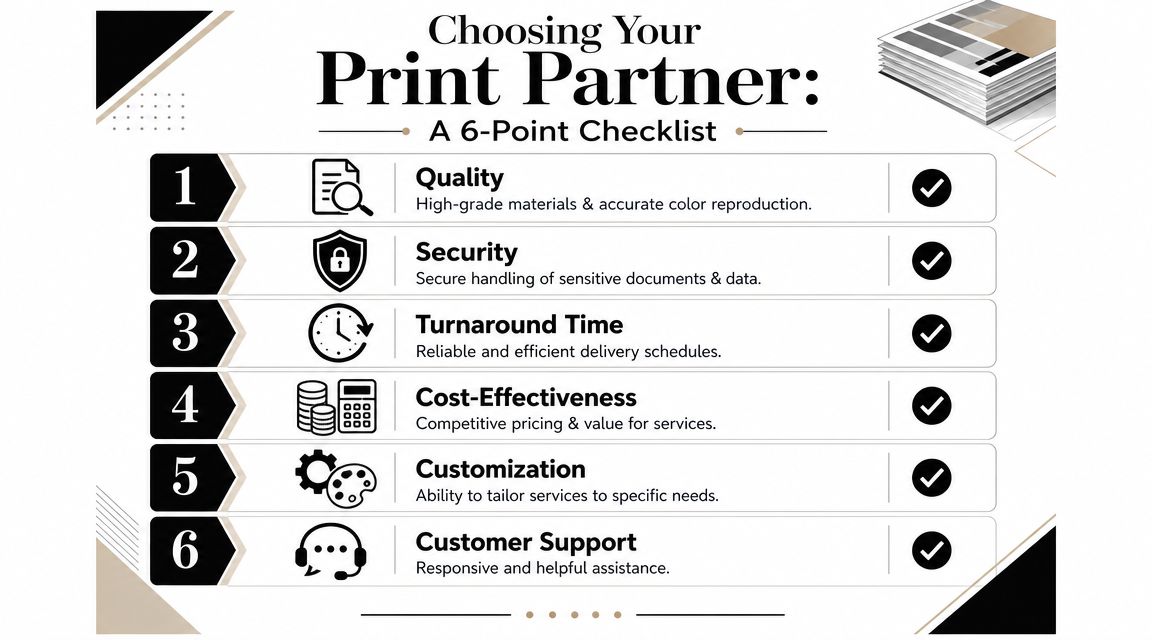
Quality shows up before anyone comments on it
An AEC firm usually notices quality when plan line weights reproduce clearly and the set stays organized from first sheet to last. A marketing team notices it when brand colors don't swing from one batch to the next. A legal office notices it when every exhibit is legible, tabbed correctly, and copied without cut-off edges.
Ask to see samples that resemble your job, not just a glossy brochure that shows the shop's nicest work. If you print manuals, look at manuals. If you print court packets, look at collated legal sets. A provider's quality standard should hold on routine work, not only on showroom pieces.
Security is a process, not a slogan
If you handle contracts, HR files, patient paperwork, financial records, or legal materials, document handling matters. You want to know who touches the files, how jobs are routed, how physical copies are packed, and whether scanning and conversion are part of a controlled process.
For many businesses, the practical security question is simple: can this provider help reduce unnecessary handoffs? Fewer loose steps usually mean fewer mistakes.
Turnaround matters most when the job changes late
A law office sends corrected pages after hours. A contractor needs one more addendum inserted into every set. A marketing department catches an outdated phone number after approval. Good providers don't pretend changes never happen. They have a workflow that can absorb them.
Modern print solutions built around workflow automation and digital document conversion reduce manual handling and combine printing, scanning, and copying into a faster routing and archiving process. That's a real buying criterion. You're not only hiring output capacity. You're hiring a cleaner document path.
Here's a useful reference if you're comparing remote ordering options and file submission models: online printing services for business jobs.
Six questions worth asking
Can you match the job to the right process?
A good shop should explain why a document belongs on digital, offset, or large format without defaulting to one answer for everything.
What file types do you accept, and do you review them before production?
PDF is usually safest. Some workflows also use TIF or hard-copy originals.
What finishing do you recommend for this use case?
A bound manual, a tabbed legal packet, and a folded mailer shouldn't get the same treatment.
How do you handle revisions after submission?
Revision discipline separates organized providers from chaotic ones.
What delivery options do you support?
Pickup, local delivery, shipment, or direct-to-site distribution can all matter depending on the document.
Can you support scanning, archiving, or digital conversion too?
Increasingly, printed documents are part of a larger recordkeeping process.
What works: Providers who ask about end use, deadlines, file source, and who will handle the document after printing.
What doesn't: Providers who only quote paper and quantity.
For businesses in New York that need document printing, copying, scanning, legal support, or AEC production, one factual example is Camelot Print & Copy Centers, which serves the Capital Region and Hudson Valley from locations in Latham and Hopewell Junction.
Common Business Document Printing Use Cases
The strongest argument for professional business document printing services isn't theory. It's how often specialized jobs break when people try to run them like ordinary office copies.

The broader category is still large. The global commercial printing market is projected to reach $517.4 billion in 2026, and one of the biggest shifts is toward value-added work rather than commodity output, according to Market.us commercial printing statistics. That tracks with what businesses buy when the documents matter. They don't just need pages. They need the pages assembled into something usable.
AEC plan sets and spec books
Architects, engineers, and contractors rarely need “printing” in the generic sense. They need accurate reproduction, page control, readable details, and dependable packaging. A missed sheet index or a muddy line can create field confusion fast.
A typical process looks like this:
- Submit current files: Usually PDFs, often with naming conventions that matter.
- Check scale and page order: The provider should confirm the set is complete before running production.
- Choose output and binding: Loose sheets, stapled packets, or spec book formats depend on how crews and estimators will use them.
- Route to the right destination: Office, site trailer, estimator, or meeting location.
Legal packets and court-ready documents
Law firms need precision more than flair. The hard part isn't the impression on paper. It's the control of sequence, exhibits, tabs, duplication quality, and delivery timing. If the matter includes scans, copies from mixed originals, or last-minute insertions, the workflow matters even more.
For firms that routinely manage filings and exhibits, it helps to review how specialized legal printing services support secure preparation and delivery.
In legal work, “close enough” usually means “do it again.” The right provider helps you avoid that second trip.
Marketing collateral and presentation pieces
Marketing teams often need short-run color work that looks sharp without ordering a warehouse's worth of inventory. Sell sheets, brochures, leave-behinds, presentation folders, and event handouts benefit from better stock, cleaner finishing, and controlled color.
Business document printing services shift their role from back-office support to protecting brand consistency. The difference between an office print and a production print is often subtle until the piece lands in a client's hand.
Menus, guides, and internal documents that take abuse
Restaurants, schools, clinics, and field teams often need printed materials that get handled constantly. Menus, checklists, guides, intake packets, and training sheets wear out fast if they aren't matched to the right stock and finish.
Storage matters too. If you keep printed records or backup sets on site, sturdy filing systems and secure office storage cabinets can help protect sensitive paper documents between use and archive.
The basic workflow clients should expect
If you're new to outsourced printing, the usual path is simple:
- Send the file or originals.
- Confirm specs. Quantity, size, stock, color, sides, finishing, and deadline.
- Review a proof if needed.
- Approve production.
- Receive the finished job by pickup, delivery, or shipment.
What calms most first-time buyers is understanding that proofing isn't a delay. It's insurance. The few minutes spent reviewing a proof can prevent hours of reprinting.
Understanding the Printing Workflow From Order to Delivery
A smooth print job doesn't start at the press. It starts with a clean handoff. The businesses that get the best results usually give complete instructions early, then review proofs carefully and avoid late-stage assumptions.
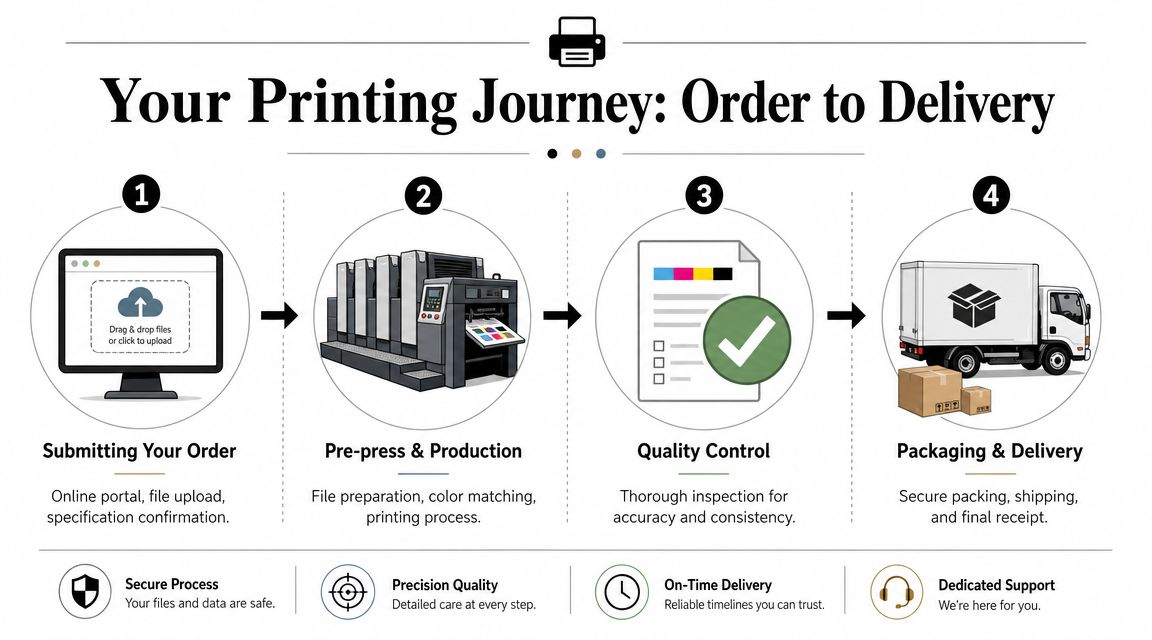
Submitting the order
Most providers can accept digital files, and many can also work from hard copy. The safest route is usually a press-ready PDF, especially for documents with fixed layout. Include the practical details that affect production: finished size, color or black and white, single-sided or duplex, binding style, quantity, deadline, and delivery method.
If your job has sections that must stay together, say so explicitly. Don't assume the provider will infer packet structure from the file name.
Proofing and prepress
Proofing is where preventable mistakes get caught. This stage checks whether the file prints the way you think it will print. Page order, margins, crop area, image clarity, color expectations, tab placement, and finishing instructions should all be reviewed here.
Shop-floor advice: The proof is your last cheap correction. After approval, changes get slower and more expensive.
Good providers also run a prepress review in the background. They're checking for issues that can break production even if the document looks fine on screen.
Production and quality control
Once approved, the file moves into production on the equipment that fits the job. During this stage, the provider manages output consistency, collation, and any special handling instructions tied to the order.
Quality control isn't just about whether the ink looks good. It includes page completeness, finishing accuracy, pack-out, and whether the final piece matches the approved specs. That's especially important when multiple sets, departments, or destinations are involved.
Finishing and delivery
After printing, the job may be cut, folded, bound, laminated, tabbed, boxed, or labeled for distribution. This final step often determines whether your team experiences the order as “done” or “one more thing to fix.”
That's why a strong print provider functions as part of your business workflow. The value isn't only in making documents look polished. It's in reducing friction from submission through final delivery. If you're evaluating local support in New York, look for a provider that can handle both recurring document jobs and specialized requests without pushing you into a one-size-fits-all ordering process.
Your Partner for Professional Printing in New York
A good print relationship saves more than money. It saves staff time, reduces avoidable errors, and keeps important documents from turning into last-minute fire drills. That's why the smartest buyers look past the cheapest quote and pay attention to workflow fit, document handling, finishing accuracy, and delivery reliability.
For businesses in New York, that usually means choosing a provider that can support everyday needs and specialized work under one roof. Marketing collateral, manuals, legal packets, AEC plan sets, scanning, copying, and oversized graphics all require slightly different production habits. It helps when the same shop can manage those details without sending you to multiple vendors.
Camelot Print & Copy Centers serves New York's Capital Region and Hudson Valley, with locations in Latham and Hopewell Junction. The company's stated services include high-impact color and black-and-white printing, copying, professional scanning, in-house graphic design, AEC plan reproduction and spec books, legal document support, and local delivery options for business clients. If you're looking for a nearby provider, this overview of printing services near you in New York gives a useful starting point.
The right next step is simple. Don't ask only for a price. Ask for a quote built around the way your team works, the deadlines you face, and the kind of documents you need to produce consistently.
If you need a personalized quote for document printing, copying, scanning, legal materials, AEC plans, or marketing collateral, contact Camelot Print & Copy Centers. Share your file type, quantity, finishing needs, deadline, and delivery requirements, and you'll get a quote built around the job instead of a generic per-page estimate.