We’ve all been there. That sudden, gut-wrenching feeling when a deadline pops up out of nowhere. Your first instinct is probably to grab your phone and search for "same day printing near me." For anyone in a time crunch—from businesses needing last-minute trade show flyers to students with a project due tomorrow—that search feels like a lifeline.
The good news? With a reliable local print shop and a little bit of prep work, you can absolutely turn that crisis into a win. It's not just possible; it's something we help people do every single day.
Your Lifeline for Last-Minute Printing Deadlines
When time is the one thing you can't afford to waste, waiting days for essential documents just isn't going to cut it. You need professional-quality print materials, and you need them now. This guide is here to pull back the curtain on the entire process and show you how to handle those urgent print jobs like a pro.
Think of same-day printing as the express checkout for your most important projects. It’s all about speed and efficiency, designed to get professionally printed materials into your hands before the end of the business day. And honestly, it’s become a mission-critical service for a lot of people.
Why Speed Matters in Professional Printing
The need for fast, reliable printing isn't just a convenience anymore; it's a necessity. Small businesses, law firms, and event planners, in particular, operate on tight schedules where delays can be disastrous. The quick printing sector is a powerhouse, pulling in $4.6 billion in revenue in the United States alone, a testament to its critical role in today's economy.
This growth is exactly why having a dependable local partner is so important. At Camelot Print & Copy Centers, we've spent over 25 years helping businesses across New York's Capital Region and the Hudson Valley meet their deadlines. You can read more about the quick printing industry's growth on ibisworld.com.
In this guide, we'll walk you through everything you need to know to make your next urgent print job a success. We’ll cover:
- What you can actually print same-day: A realistic look at which products, like flyers and business cards, are perfect for a quick turnaround.
- How to prep your files: A simple checklist to make sure your designs are print-ready and avoid frustrating delays.
- The ordering process: How to navigate cutoff times and understand what happens behind the counter.
- Avoiding common problems: We'll share some pro tips to sidestep the pitfalls that can derail an urgent project.
By the time you're done reading, you’ll be ready to tackle any last-minute printing challenge with confidence. That potential headache? Consider it solved.
What You Can Realistically Print Today
When you're in a pinch and the clock is ticking, the most important thing is to know what’s actually possible. Think of a print shop like a professional kitchen. Some dishes are quick-fire and can be on your table in minutes, while others require slow-roasting. The same goes for printing.
The magic behind getting things done fast is our digital printing technology. Forget the old-school offset presses that need long, complicated setups. Digital printers work directly from your computer file, letting us get started almost instantly. This is why it’s the powerhouse for almost any "same day printing near me" request, especially for smaller batches.
The Express Lane Products
So, what’s on the quick-fire menu? The projects we can turn around the same day usually have a few things in common: they use standard paper, need minimal finishing touches, and are perfect for our digital presses.
Here’s a look at what you can almost always get done in a day:
- Flyers and Brochures: These are the bread and butter of quick marketing. Need handouts for a last-minute event or some trifolds for a meeting? Standard sizes like 8.5"x11" or 11"x17" are a breeze.
- Business Cards: It happens to the best of us—you run out of cards right before a big conference. We can get a fresh stack of standard business cards printed and cut for you in just a few hours.
- Posters and Banners: If you need to grab attention now, we've got you covered. Many posters (up to certain sizes) and basic vinyl banners are well within the scope of same-day service.
- Manuals and Presentations: Need to get training manuals or presentation decks ready for a meeting? Simple binding, like a corner staple or a spiral coil, makes for a quick assembly.
- Legal and Architectural Documents: We know that for legal and construction pros, time is everything. Getting crisp, accurate copies of blueprints, spec books, or legal briefs is a top priority for our same-day service.
The key takeaway is this: If your project uses standard materials and just needs a simple finish, there's a fantastic chance we can get it done for you today. The more unique or custom the job, the more time it’s going to need.
Projects That Need More Time
Just like a gourmet chef can’t rush a five-course meal, some print jobs have steps that simply can't be hurried without sacrificing quality. It's always better to plan ahead for these.
Give us a little more lead time for projects that involve:
- Intricate Binding: Things like perfect binding—the kind you see on a paperback book—require glues that need time to cure properly.
- Custom Finishes: Those really nice touches like foil stamping, embossing, or spot gloss coatings are all separate processes that add to the timeline.
- Custom Die-Cuts: If you want your print piece cut into a unique shape, it requires a custom die to be made, which isn't a same-day kind of job.
- Large Quantities: Even with our fast digital presses, a massive order is going to take longer than a single business day to produce and finish correctly.
Knowing the difference between a sprint and a marathon project helps you walk into your local printer with a request that is both confident and realistic. When you know what's possible from the get-go, you set your urgent project up for a smooth, stress-free success.
Your Print-Ready File Checklist: The Secret to a Flawless Finish
The real secret to getting your project printed today without any hiccups? It all comes down to the file you send us. Submitting a print-ready file is the single best thing you can do to guarantee a smooth, fast process.
Think of it like giving a carpenter a perfect set of blueprints. The clearer those plans are, the faster and more accurately they can build your project. A print-ready file has all the technical details sorted out ahead of time, letting it sail right through to production without needing any time-consuming fixes from our team. This simple pre-flight check is what keeps your urgent timeline on track.
Get These Core Settings Right
Before you even think about hitting 'send,' take a minute to double-check these three things. Getting them right from the get-go will save you—and us—a ton of back-and-forth.
- Resolution (300 DPI): This is all about sharpness. For printing, the gold standard is 300 DPI (dots per inch). Images you grab from a website are usually a much lower 72 DPI, which will look fuzzy and pixelated on paper. Stick to high-resolution images for that crisp, professional look.
- Color Mode (CMYK): Your computer screen shows colors in RGB (Red, Green, Blue). Our professional presses, however, run on a different system: CMYK (Cyan, Magenta, Yellow, Black). If you convert your file to CMYK before sending it, the colors in your final printed piece will look much closer to what you saw on your screen.
- File Format (PDF): When you're done, always save and send your final design as a high-quality PDF. A PDF is like a locked-down snapshot of your work—it embeds all your fonts and images so nothing shifts or changes when we open it on our end.
Why Your Design Needs "Bleed"
Ever gotten a brochure back from a printer with a thin, awkward white line along the edge? That's almost always because the design was missing what we call a bleed.
Bleed is a little extra bit of your background image or color that extends past the final trim line. It’s a safety margin. When we cut the final prints down to size, that extra bit ensures your design goes right to the very edge of the paper, leaving no room for those pesky white slivers. We recommend adding a 0.125-inch bleed on all sides.
The printing world has changed a lot, and fast turnarounds are now a must-have, especially for industries like education and marketing that move at a breakneck pace. Even as costs have risen for many printers, customers rightly expect speed and value—which is where an efficient shop like Camelot really shines.
Getting every part of your project just right is key. This is just as true for supplementary items as it is for the main document; for example, successfully mastering shipping labels printing is essential for ensuring your packages get where they need to go without a hitch.
Want to learn more about dodging common file issues before they even start? Check out our guide on the most common file mistakes and how to avoid them.
Understanding Cutoff Times and Order Timelines
When you're up against a tight deadline and searching for "same day printing near me," the most critical thing to watch is the clock. Every print shop operates on a production schedule, and hitting that same-day window means working with a hard cutoff time.
Think of it like the kitchen in a restaurant. You can’t walk in at closing time and expect a full three-course meal. We need your final, print-ready files by a certain point—usually around 12 PM—to have enough time to slot your job into the queue, print it, finish it, and have it ready for you. Getting your files to us before that cutoff is the number one thing you can do to guarantee a successful turnaround.
What Happens After You Order?
Once we have your file, it doesn't just go straight to the printer. It enters a queue with all the other projects for the day. The actual time it takes to complete your order depends on two things: our existing workload and the complexity of your job. A simple stack of flyers is a quick sprint, while a project like spiral-bound training manuals is more of a marathon that involves multiple steps.
Our team gives every file a quick "pre-flight" check to make sure it's good to go. This is where we catch any issues that could cause delays.
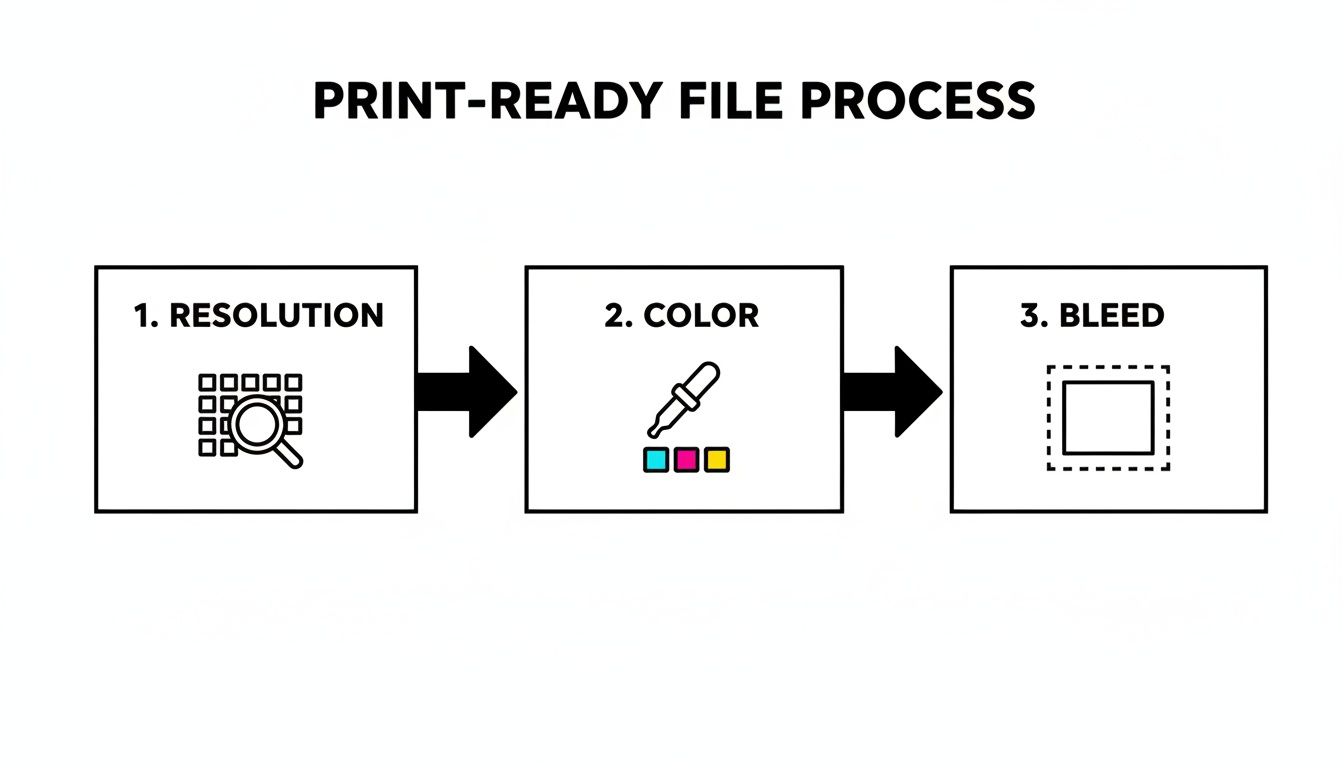
This simple check for things like resolution, color, and bleed is what lets us move your project into production without a hitch.
Why Is There a Rush Fee?
You'll often see a rush fee attached to same-day service, and it's fair to ask why. It isn't a penalty—it’s what allows us to completely reshuffle our schedule for you. When a rush order comes in, we often have to pause a job that's already in progress, re-calibrate a machine, and bump your project to the very front of the line.
A rush fee is really an investment in speed. It covers the operational gymnastics required to interrupt our standard workflow, dedicate immediate resources to your job, and hit your deadline without sacrificing quality.
This fee ensures we can make those adjustments and still deliver the top-notch results you expect, just on a much faster timeline. We're always upfront about any rush fees before we begin, so there are no surprises.
Knowing how cutoff times, project complexity, and our production queue all fit together makes the whole process smoother. It helps you plan ahead, get your files to us on time, and turn a stressful deadline into a successful project.
Common Printing Pitfalls and How to Avoid Them
When you’re in a rush, a simple file mistake can suddenly turn into a major roadblock, causing frustrating delays or even forcing a complete do-over. Taking a few moments to double-check your files is the single best thing you can do to guarantee a smooth same-day printing experience. It's like proofreading an important email one last time before hitting send.
One of the most common issues we see? Blurry, low-resolution images. It's so easy to just grab a picture from a website or social media, but those are almost always compressed to 72 DPI so they load quickly online. For print, you need 300 DPI for a crisp, professional result. Using a web image for a printed piece is like trying to stretch a postage stamp to the size of a movie poster—it just ends up a pixelated mess.
Another classic snag is submitting the wrong file format. Sending us a Microsoft Word or Publisher file is risky because fonts, images, and layouts can shift completely when we open them on our end. That’s why a print-ready PDF is the universal language of printing.
Your Quick-Check Guide to a Perfect Print
To keep your project moving and avoid those last-minute panic moments, run through this simple checklist. Think of it as your insurance policy against a missed deadline.
Stick with High-Resolution Images: Always, always use original, high-quality photos. Never use a screenshot or a small image you've saved from a website for your print materials.
Don't Forget the Bleed: If your design has color or images that go all the way to the edge of the page, you need to add a 0.125-inch "bleed." This extra margin gives us room to trim the paper, ensuring you don't end up with ugly white slivers along the border.
Lock It In with a PDF: A PDF is a perfect snapshot of your design. It locks in all your fonts and images, so what you see on your screen is exactly what we’ll see on ours. For a little extra help, check out our guide on creating print-ready PDFs.
A PDF basically speaks "printer" fluently. It translates your design perfectly, cutting out any confusion between different computers or software—a must-have for getting things done fast.
Getting familiar with common printing mistakes is a huge advantage for any last-minute project. For a deeper dive, this article on 5 Classic Printing Mistakes and How to Avoid Them is a fantastic resource. By catching these potential problems ahead of time, you can be confident your project will sail right through production and be ready when you need it.
Your Local Partner for Urgent Printing Needs
When a deadline is breathing down your neck, it’s not just about finding any print shop—it's about finding the right one. All the file prep tips in the world won’t help if the team on the other end can’t deliver. That's where we come in. Think of Camelot Print & Copy Centers as your go-to partner for any "same-day printing near me" emergency.
For over 25 years, we’ve been the trusted resource for businesses and professionals throughout New York’s Capital Region and the Hudson Valley. We’ve built our reputation by blending meticulous quality control with the speed necessary to hit your most urgent deadlines with confidence.
Your Deadline Is Our Mission
We've built our entire process around one simple idea: turning your last-minute request into a polished, professional product you're proud of. We get it—architects need flawless blueprints for a surprise client meeting, law firms need perfectly collated court documents now, and marketers need vibrant trade show materials that can't be a day late.
At Camelot, we don't just process orders; we build relationships. Our team is here to offer friendly, expert guidance to make sure your project is done right and on time, every single time.
We’re more than just a printer; we're an extension of your team when you need it most. Whether it's a stack of simple flyers or a set of complex training manuals, our print and copy services are geared for quick turnarounds without ever cutting corners on quality.
Get Your Urgent Project Started Now
Ready to turn that printing emergency into a success story? Our teams in Latham and Hopewell Junction are on standby to help you out. You can send your files over online for a quick start or swing by one of our shops for some hands-on help.
- Camelot of Latham (Capital Region): 630 Columbia St Ext, Latham, NY 12110
- Camelot of Hopewell Junction (Hudson Valley): 816 Route 82, Hopewell Junction, NY 12533
Don’t let a tight deadline get the best of you. Get in touch with us today, and let our experienced team take it from here.
Same-Day Printing FAQs
When you're up against a tight deadline and searching for "same day printing near me," a few questions are bound to pop up. Let's get you some quick, clear answers to the most common things people ask us.
What's the Best File Format for a Rush Job?
Hands down, a high-resolution PDF is your best bet. It’s the gold standard in the print world, and for good reason.
Think of a PDF as a perfect, locked-down snapshot of your design. It packages up all your fonts, images, and layout details so that what you see on your screen is exactly what we see on ours. This completely sidesteps those pesky formatting surprises that can derail a tight timeline. We can sometimes make other file types work, but a print-ready PDF is the fastest, most reliable way to go.
Is Same-Day Printing More Expensive?
You can expect to see a rush fee for an expedited job. It's not a penalty—it's what allows us to rearrange our entire production schedule to fit you in immediately.
To hit your deadline, our team often has to stop what they're doing, pause other scheduled jobs, and dedicate a machine just for you.
A rush fee is really just an investment in speed. It covers the logistical hustle required to bump your project to the very front of the line. We’ll always be upfront about any extra costs before we get started.
Can I Get Something Complicated, Like a Bound Book, Printed Today?
It really comes down to the specifics of the project. We can often turn around simpler items, like presentations or stapled booklets, in just a few hours.
On the other hand, more complex jobs—especially things like perfect-bound books or coil-bound manuals—require extra steps for production, assembly, and even drying time. For anything beyond simple printing and cutting, the best thing to do is just give us a call. We can talk through what you need and figure out the fastest way to get it done right.
When your deadline is non-negotiable, you need a local partner you can trust. At Camelot Print & Copy Centers, we combine speed with the quality your brand deserves.
Ready to get your project started? Submit your job online or contact our team today!