When you think of a business card, a specific size probably pops into your head. That's no accident. The standard business card size in the United States is a familiar 3.5 x 2 inches. This isn't just a random measurement; it's a carefully considered standard that makes networking smooth and professional. It’s designed to slip perfectly into a wallet or cardholder.
Why Does a Standard Size Matter?
Think about it: when you hand someone your card, you want them to keep it. An odd-sized card might look cool, but if it doesn't fit anywhere, it’s far more likely to get lost or tossed aside. Sticking to the standard shows you understand the unwritten rules of business etiquette. It’s practical, professional, and instantly recognizable.
The dimensions are what make it so universally useful. In both the U.S. and Canada, that 3.5 x 2-inch card (or 89 x 51 mm) is king. This size fits into 95% of standard wallets and business card holders. That simple fact alone can reduce the chance of your card being misplaced by as much as 20% compared to a custom-shaped or oversized one. It’s a small detail that makes a big difference.
Getting the Dimensions Right for Your Design
Okay, so you have the physical size down. But how does that translate to your design file? Getting this right is crucial for a sharp, professional print job, especially when you send your files to a print provider like us here at Camelot.
Here’s a quick reference table to help you set up your files correctly, no matter what unit of measurement your software uses.
Standard Business Card Dimensions Quick Reference
This table provides a quick-reference guide showing the standard business card dimensions across different units of measurement for design and printing.
These are the foundational numbers for your design. While standards can differ a bit around the globe—for a great breakdown, check out this guide on the NZ business card size—the 3.5" x 2" format is the undisputed champion in North America.
Nailing these basic dimensions is the first, most important step. Once you have this down, you’re ready to move on to the more technical (but equally important) concepts of bleed, trim, and safe zones.
How Card Dimensions Impact Your Brand Perception
Your business card is far more than just a piece of paper with your contact info—it’s a physical extension of your brand. Think of it as the firm handshake after a great conversation. The size and feel of that card continue the conversation long after you’ve parted ways, quietly shaping how people see your business.
This is where the standard business card size plays a surprisingly big psychological role. Handing someone a card that’s 3.5 x 2 inches instantly signals that you’re prepared, professional, and you get how business works. It's a subtle cue that you respect their time and their existing systems, like their wallet or cardholder.
The Problem with Unconventional Sizes
It might seem clever to stand out with a unique, oversized, or custom-shaped card, but it often backfires by becoming a practical nuisance. If your card doesn't fit neatly into a standard wallet slot, its journey often ends on a cluttered desk or, worse, in the trash. The goal isn't just to be noticed for a second—it's to be kept for future reference.
Adhering to the standard size ensures your card has staying power. It’s a practical choice that communicates reliability and makes it easy for potential clients to keep your details on hand, maximizing your networking potential.
Building Credibility Through Convention
Opting for the standard size actually reinforces your brand's credibility. It shows you’ve thought about the person receiving it, which is a small but meaningful detail. This thoughtful approach builds subconscious trust and suggests that your business operates with the same attention to detail. Consistency in these small things implies consistency in the quality of your work.
Of course, size is just one piece of the puzzle. The overall visual design is equally vital in shaping perception. For a deeper look into how visual elements affect your brand, our partners have a great guide on graphic design services that can help you create a cohesive brand identity.
Beyond physical dimensions, other design choices significantly influence how your business is perceived. For instance, understanding the psychology of website colors and how your palette impacts brand perception can be crucial. Ultimately, a standard-sized card provides the perfect, universally accepted canvas for a design that truly reflects your brand’s quality and professionalism, ensuring it makes the right impression every time.
Comparing Business Card Sizes Around the World
While the standard business card size in North America is a familiar 3.5 x 2 inches, that little rectangle isn't a universal passport for networking. When you do business internationally, you quickly realize that local customs extend all the way down to the dimensions of the card you hand someone.
Think of it like using the right power adapter when you travel—it's a small detail that shows you've prepared and respect local norms. A card that fits the local standard feels right, signaling that you've done your homework and care about making a good first impression.
European and UK Standards
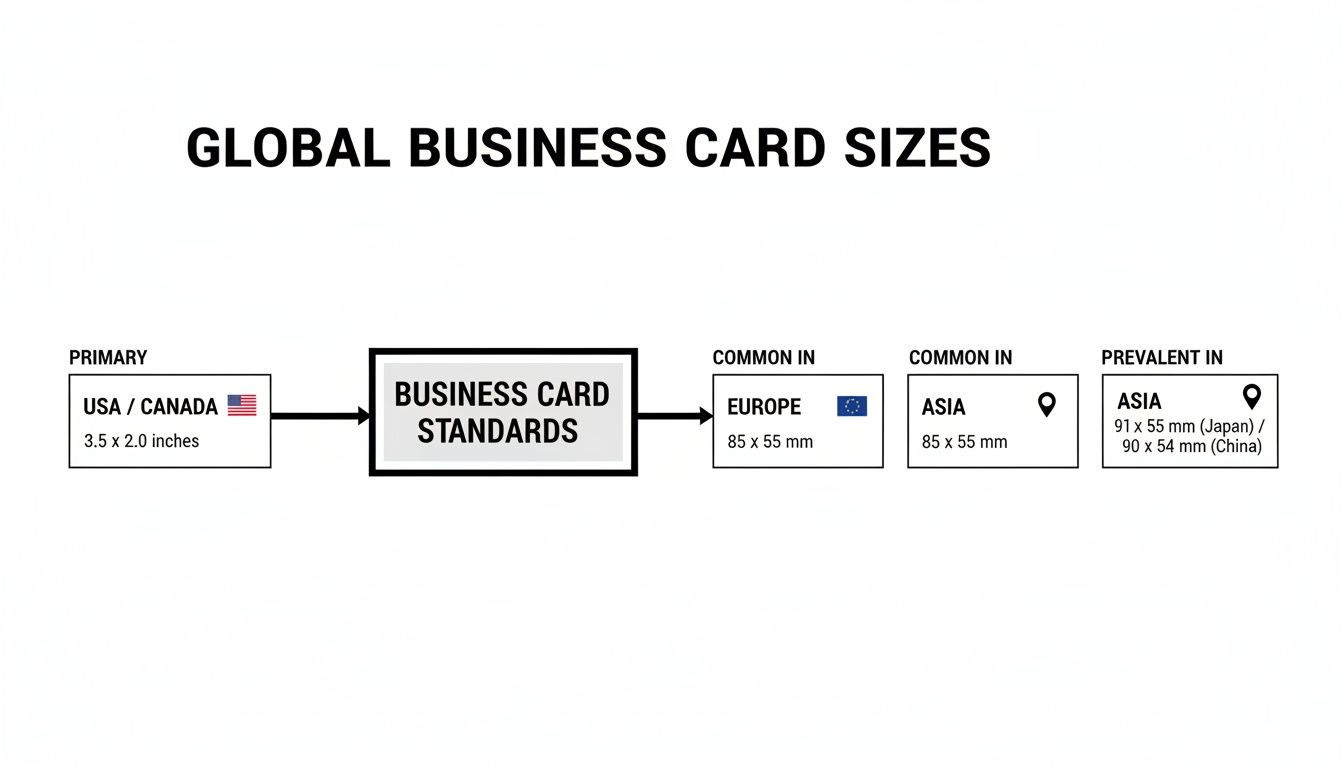
Across the pond in Europe, you'll find business cards are often sized similarly to a credit card. The most common size in Western Europe—think France, Germany, and Spain—is 85 x 55 mm (that’s 3.346 x 2.165 inches). It’s just a tiny bit shorter and wider than its American cousin.
The United Kingdom also sticks to this European standard of 85 x 55 mm. The difference might seem insignificant, but you'll notice it when cards are stacked together. Using this size for your UK or European contacts ensures your card fits neatly into their wallets and card holders.
Asian Business Card Dimensions
Over in Asia, the variations become more pronounced, often tied to deep-rooted professional traditions. In Japan, for example, the exchange of "Meishi" (business cards) is a formal ritual, and the card's dimensions are part of that. The standard Japanese Meishi is 91 x 55 mm (3.582 x 2.165 inches), which is slightly longer than the American standard.
When you're in Japan, presenting a card with the correct Meishi dimensions is a sign of respect. It shows you understand the cultural importance of the exchange, moving it beyond a simple transaction and into the realm of relationship-building.
Other Asian countries have their own preferred sizes. In China, for instance, you'll often see cards measuring 90 x 54 mm (3.543 x 2.125 inches). Paying attention to these small differences is a simple but effective way to build stronger international connections.
To make sense of these global standards, I've put together a quick reference guide.
International Business Card Size Comparison
Here’s a simple table comparing the standard business card dimensions across major regions, with measurements in both inches and millimeters.
At the end of the day, your North American card will get the job done overseas. But if you really want to stand out, tailoring your card to the local standard is a savvy move. It’s a subtle nod that shows you appreciate the finer points of business culture, helping you leave a positive impression that lasts.
Preparing Your Print-Ready Design File
Once you’ve nailed down the dimensions, it’s time to get your design file ready for a professional printer. This is the crucial step where your ideas become something you can actually hold in your hand, and getting it right means paying attention to a few technical details. It all boils down to understanding three key zones in your design file: the bleed, the trim line, and the safe area.
Think of it like putting a photo in a picture frame. You always choose a photo that's slightly larger than the frame's opening to make sure no weird white gaps show around the edges. Printing works the same way—that extra bit of image is essential for a clean, professional finish.
As you can see below, business card sizes aren't universal. What's standard in the US is slightly different from what you'd get in Europe or Japan, which makes setting up your file correctly even more important.
The Three Pillars of a Print-Ready File
To make sure no part of your awesome design gets chopped off, you need to set up these three zones in your file. Getting them right is the secret to a perfectly printed card.
Bleed Area: This is the outer margin of your design that gets trimmed off. For a standard business card size, you need to add an extra 0.125-inch border on all four sides. This brings your total file dimensions to 3.75 x 2.25 inches. Any background colors, patterns, or images meant to go to the edge of the card must extend all the way out to this bleed line.
Trim Line: This is the line where the printer's cutter will slice the card down to its final size. For a standard U.S. card, this is exactly 3.5 x 2 inches. The cutting machines are incredibly precise, but we're talking about paper, and tiny shifts can happen. That's why the bleed is your best friend.
Safe Area: This is the "no-fly zone" for your most important content. Keep all your text, your logo, and any critical information at least 0.125 inches inside the trim line. This simple step guarantees your phone number or email address won't get nipped during the final cut.
By designing with these three zones, you’re creating a buffer that ensures a perfect trim every single time. The bleed gives the printer room for error, and the safe area protects what matters most.
If you want to dive deeper into this, we have a whole guide where you can learn more about what a print bleed is and why it's so fundamental to professional printing.
Essential Technical Specs
Beyond the layout, there are two other technical details that can make or break your final product. Get these wrong, and you risk a card that looks fuzzy, pixelated, or just… off.
First, your design's resolution needs to be 300 DPI (dots per inch). Images on the web are usually a much lower 72 DPI, which looks perfectly fine on a screen. But if you print a 72 DPI file, it will look blurry and unprofessional. Start your design in 300 DPI from the get-go to ensure every line is razor-sharp.
Second, your file must be set to the CMYK color mode, which stands for Cyan, Magenta, Yellow, and Black. Your monitor uses the RGB (Red, Green, Blue) color model to display images with light. Professional printers, on the other hand, use CMYK inks to mix colors on paper. Designing in RGB and then printing can lead to some surprising and disappointing color shifts. Converting to CMYK is a must for color accuracy.
Choosing Paper That Enhances Your Design
The standard business card size is your canvas, but the paper you choose is what truly brings your design to life. A business card isn't just a visual tool; it's a tactile experience. The way it feels in someone's hand can often say more about your brand than the words printed on it.
Think of it like a good suit. The size makes sure it fits, but the fabric—its weight and texture—is what makes it feel premium. A heavier, more substantial paper stock feels confident and high-quality, projecting a sense of permanence. It’s the difference between a flimsy, forgettable handshake and a firm, memorable one.

Matching Paper to Your Industry
Your paper choice should be a deliberate extension of your brand identity. There’s no single "best" option here; it's all about matching the material to the message you want to send.
- Creative Agencies and Designers: You might lean toward a unique, tactile finish like soft-touch matte or even a textured cotton paper. These choices invite people to touch the card, creating a memorable sensory moment that highlights your innovation.
- Law Firms and Financial Advisors: For industries built on trust, a classic, heavy uncoated stock works wonders. Its simple elegance and substantial feel reinforce a message of stability and time-honored professionalism.
- Tech Startups and Retailers: A vibrant glossy finish can make bold colors and logos pop. The smooth, reflective surface feels modern and energetic, perfect for photo-heavy designs and contemporary brands that want to stand out.
The weight and finish of your card are non-verbal cues. A thin, flimsy card might unintentionally suggest your business cuts corners, while a premium, thick card stock immediately elevates how people perceive your quality and attention to detail.
Diving into the world of paper can feel a little overwhelming at first, but it’s a crucial part of the process. If you’re curious about what all those numbers mean, you can learn more about paper weight points in our detailed guide. Making an informed choice ensures the physical experience of your card perfectly aligns with your professional image.
Your Top Business Card Design Questions, Answered
Now that we've covered the basics, you probably have a few practical questions bubbling up. Let's tackle some of the most common ones that come up when designing a business card. This will help you sidestep common pitfalls and move forward with confidence.
Should My Business Card Be Horizontal or Vertical?
The classic horizontal (landscape) layout is what most people expect. It’s the tried-and-true format that slides perfectly into any wallet or cardholder, making it a safe and professional choice for just about any industry. It just works.
That said, a vertical (portrait) card is a fantastic way to break the mold and get a second look. This orientation can be a game-changer for brands with a tall logo or those aiming for a more modern, creative vibe. Both layouts use the same standard 3.5 x 2-inch dimensions, so the choice is all about style and what feels right for your brand.
What Are the Correct Pixel Dimensions for a Business Card?
This is a big one. For any professional print job, your design file absolutely must be set to 300 DPI (dots per inch). This high resolution is the secret to getting sharp, clear text and images instead of a blurry, pixelated mess.
So what does that look like in practice? For a standard 3.5 x 2-inch card, the pixel dimensions at 300 DPI are 1050 x 600 pixels. But remember the bleed! To account for the 0.125-inch bleed on all four sides (making the total file size 3.75 x 2.25 inches), your final design file should be 1125 x 675 pixels. Getting this right from the start is non-negotiable for a professional result.
Nailing your pixel dimensions and bleed from the very beginning is the single best way to avoid printing headaches. It prevents fuzzy text and stops crucial information from getting trimmed off during production.
Can I Get a Custom-Shaped Business Card?
You certainly can! Custom-shaped, or die-cut, cards are incredibly memorable and can make a huge impact. Think of a coffee shop with a card shaped like a coffee bean or a photographer with one that looks like a camera. They're a brilliant way to showcase your brand's personality.
The main tradeoff here is practicality. While a unique shape will definitely turn heads, it's not going to play nice with standard wallets or business card scanners. They are also a specialty item, meaning they'll cost a bit more to produce than a standard rectangular card. It’s a balance between making a statement and everyday convenience.
Does Business Card Thickness Matter?
Oh, absolutely. The thickness of your card—its "stock"—sends an immediate, subconscious message about your brand. Thickness is measured in points (pt), and a standard card is typically 14pt or 16pt.
A thicker card, like a hefty 18pt or a premium 32pt "ultra-thick" stock, feels substantial and luxurious in someone's hand. It has a certain gravity to it. On the flip side, a thin, flimsy card can inadvertently make a brand feel cheap or temporary. Think of it this way: a sturdy card communicates quality and durability before a single word is read.
Ready to create a business card that people will actually want to keep? The team at Camelot Print & Copy Centers is here to guide you with expert printing, premium paper stocks, and professional design services. Get started on your project today!