If you're launching a direct mail campaign in the United States, the most popular and cost-effective option is the classic 4" x 6" postcard. Why is this size so common? It’s the sweet spot that qualifies for the USPS First-Class Mail postcard rate—the cheapest way to get your message seen without an envelope.
Decoding Standard Postcard Sizes
When people talk about a "standard postcard size," they're not referring to one single, official dimension. It's more of a range of sizes that nail the balance between making an impression and sticking to postal rules. Think of it like picking a car: a compact is great for zipping around the city, but you'll need a truck if you're hauling heavy loads. Different postcard sizes are built for different marketing jobs.
The most popular choices are all designed to play nicely with USPS regulations. This ensures your mailers fly through the automated sorting machines and land you the lowest possible postage rates. If you go outside these dimensions, you risk your budget-friendly campaign turning into an expensive headache with higher, unexpected costs. It’s no wonder the simple 4" x 6" card is the go-to for so many businesses aiming for efficiency and wide reach.
Common Dimensions and Their Uses
So, what are your options? Let's walk through the most common postcard sizes. Each one gives you a different edge, whether you're focused on saving money, need more creative real estate, or just want to make a big splash in a crowded mailbox. Understanding these differences is your first step to a smart, successful print marketing plan.
A postcard is a tiny billboard for your business. The size you choose determines how much you can say and how loudly you can say it. The key is finding the perfect balance between the message you want to send and the budget you have to work with.
To help you get a clearer picture, we've put together a quick-reference guide to the dimensions you'll see most often.
Common Postcard Sizes and Their Strategic Uses
This table breaks down the most popular postcard dimensions, giving you a quick look at their names and what they're best used for in marketing and USPS mailings.
Choosing the right size is all about matching your goals with your budget. Now that you know the key players, you can start thinking about which one will carry your message most effectively.
Why Do Postcards Have Such Specific Sizes?
Ever wondered why postcards have to be a certain size? It’s not just a random rule. The standard postcard dimensions we use today came from a game-changing decision made over a century ago to fix a massive, worldwide problem: total chaos in the mail system.
Before the late 1800s, sending anything internationally was a logistical nightmare. Every country played by its own set of rules—different sizes, different postage, different everything. This made cross-border communication a gamble, both for keeping in touch with family and for doing business.
A Global Handshake on Mail
The big shift happened in 1878 when the Universal Postal Union (UPU) stepped in to bring some order to the madness. In what was a pivotal moment for global communication, they set the first international postcard standard: 3.5 x 5.5 inches.
This one simple agreement turned the postcard from a local novelty into a powerhouse for global commerce. Suddenly, a business right here in New York's Capital Region could mail a promotional card to a customer in Europe and know for certain it would get there without any sizing issues or unexpected fees. This standardization also slashed international postage to half the letter rate, causing a boom in postcard use that helped connect the world. You can explore more about this historical impact and its legacy on modern marketing.
But this new standard was about more than just convenience. It was the first step toward building a predictable, automated system. By making all postcards the same size, postal services could finally streamline sorting, laying the foundation for the high-speed machines the USPS relies on today.
Think of it like a modern factory assembly line. Every part has to be exactly the right size to fit the machinery. Postcards work the same way—they must fit a standard size to fly smoothly through the postal system's complex network.
How a 19th-Century Rule Affects Your Budget Today
So, what does a rule from 1878 have to do with your business in the Hudson Valley? Everything. Those original standards are the direct ancestors of today's USPS regulations. When you design a postcard that meets the approved dimensions, you're not just following an arbitrary rule; you're plugging into a system built for maximum efficiency.
Sticking to the standard postcard size means your mailer is perfectly compatible with the USPS's automated sorting equipment. This compatibility is what gets you the lowest possible postage rates, which has a direct impact on your marketing budget.
Even a slightly oversized card can be kicked out by the machines, forcing a manual sort and bumping it up to the much more expensive first-class letter rate. That one small mistake can instantly drive up your campaign costs. Understanding the "why" behind the rules makes it clear that precision is the key to an affordable and successful direct mail campaign. To get it right the first time, you can always get a quote from our team.
Mastering USPS Rules to Maximize Your Budget
Knowing how to navigate postal regulations is where a good direct mail strategy really pays off. If you want to lock in that coveted First-Class Mail postcard rate, you have to play by the USPS's rules.
Think of the automated sorting machines as extremely picky gatekeepers. If your postcard doesn't meet their exact specifications, it gets kicked over to a more expensive route. A card that’s even a fraction of an inch too large or too small can instantly get reclassified and charged at the higher letter rate. On a big mailing, that one tiny mistake can completely blow your marketing budget.
The Anatomy of a Mail-Ready Postcard
The USPS is very clear about what makes a postcard a postcard. For your design to pass the test and secure the lowest possible postage, it has to hit three main criteria: size, thickness, and shape.
- Height: Must be between 3.5 inches and 4.25 inches.
- Length: Must be between 5 inches and 6 inches.
- Thickness: Must be at least 0.007 inches thick but no more than 0.016 inches thick.
- Shape: It has to be a rectangle. Simple as that.
Step outside any one of those ranges, and the USPS now considers your postcard a letter. That little change can jack up your postage costs by 30% or more per piece.
Beyond Dimensions: Aspect Ratio and Paper Weight
While the basic dimensions are crucial, the USPS also cares about something called aspect ratio—the relationship between the postcard's length and its height. To run smoothly through the sorting machines, the length needs to be between 1.3 and 2.5 times its height. A card that’s too long and skinny, or too close to a perfect square, can get flagged.
Paper weight is just as important. If a card is too flimsy (less than 0.007" thick), it can easily get mangled or jam the equipment. On the flip side, a card that's too rigid (over 0.016") is simply too thick to qualify as a postcard. That’s why professional cardstocks, like the ones we use at Camelot, are specifically selected to fall right into that sweet spot.
The consistency of postcard sizes has been a driving force in marketing for over a century. The adoption of the 4 x 6-inch standard in the U.S. was linked to a massive surge in direct mail, which grew from 1.5 billion pieces in 1960 to over 5 billion by 1980, with postcards capturing a significant market share due to their cost-effectiveness. Explore the rich history of postcard standards and their impact on mail.
Ensuring Deliverability
Following these physical rules is the first step, but it’s not the whole story. To truly get the most from your budget, you also have to master the details of the correct mailing address format. This ensures every single postcard actually gets where it's supposed to go.
When you combine the right size and paper with a perfectly formatted address, you're setting your campaign up for a smooth run from our printers right to your customer's mailbox.
Ready to design a postcard that sails through the postal system at the lowest cost? Let our experts help you navigate the rules. Get a quote from Camelot Print & Copy Centers and let's get your project started.
Setting Up Your Design File for Perfect Printing
You've picked a size and figured out the USPS rules—now comes the fun part: bringing your design to life. But before you jump into creating, we need to talk about setting up your file. Getting the technical details right from the start is the single most important thing you can do to make sure the postcard you print looks exactly like the one you designed on screen. It saves a ton of headaches and prevents costly reprints down the road.
Think of it like building a house. You wouldn't start putting up walls without a solid foundation and a precise blueprint. Your design file is that blueprint. To get it right, we need to understand three key zones: the safe area, the trim line, and the bleed.
This flowchart gives a great overview of the specifications that really matter.
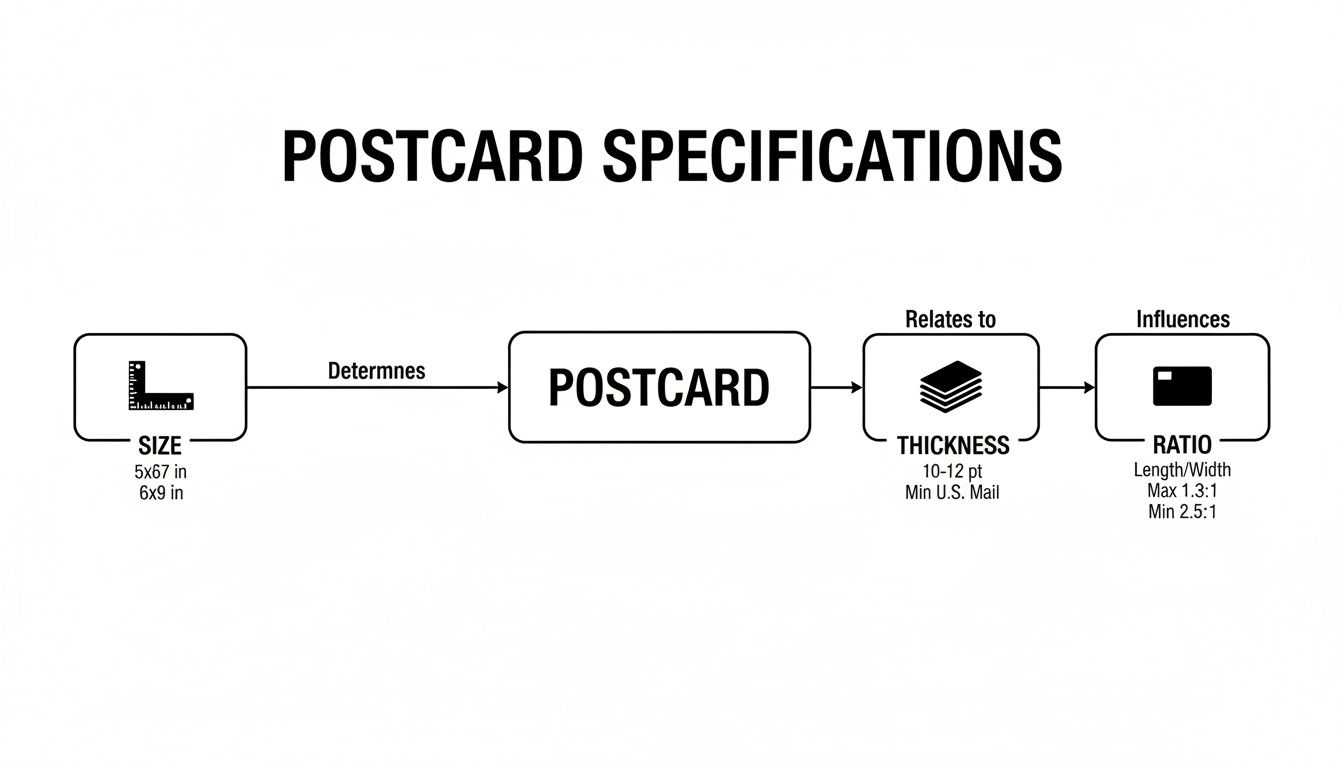
As you can see, getting the size, thickness, and aspect ratio right is the foundation for a postcard that mails without a hitch and looks fantastic.
Understanding Bleed and the Safe Area
So, what are these zones? Let's break them down.
The bleed is a small, extra margin of your background image or color that extends beyond the final cut edge of your postcard. Why? Because printing and cutting are physical processes. Giant machines trim stacks of paper at high speed, and tiny shifts are inevitable. That little bit of extra design—the bleed—ensures that even if the cut is a hair off, you won't see any ugly white slivers on the edge. It's your insurance policy for a professional, edge-to-edge finish.
- Trim Line: This is the actual line where the postcard will be cut to its final size (for example, 4" x 6").
- Safe Area: This is the "safe zone" well inside the trim line. All your important stuff—logos, text, phone numbers—needs to stay within this area to avoid getting accidentally chopped off during trimming.
The industry standard is to add a 0.125-inch (or 1/8 inch) bleed on all four sides. So, if you're designing a 4" x 6" postcard, your actual file size should be 4.25" x 6.25". We've got a whole guide that dives deeper into this, which you can read here: What Is a Print Bleed.
Resolution and File Format Essentials
Next up: clarity. For your postcard to look sharp and professional, not fuzzy or pixelated, your design file has to have a high resolution. The gold standard for quality printing is 300 DPI (dots per inch). Anything less, and you risk your images and text looking blurry in the final product.
Finally, the way you save your file is crucial. The best format, hands down, is a press-ready PDF. A PDF is like a locked box—it embeds all your fonts, images, and layout elements into a single, self-contained file. This means that when we open it on our end, it looks exactly the way you intended, with no surprise font changes or missing images.
Getting these technical specs right—bleed, resolution, and file format—is how you hand off a perfect blueprint to your printer.
Your Print-Ready Postcard Checklist
Feeling overwhelmed by the technical details? Don't be. Here’s a simple checklist to run through before you send your postcard file to print. It summarizes everything you need for a flawless result.
Nailing these five points is your ticket to a smooth printing process and a postcard that looks absolutely incredible.
Choosing the Right Postcard Size for Your Goal
Picking the right postcard size isn’t just about specs and numbers; it’s about strategy. What are you trying to accomplish? Your choice should be a deliberate move that lines up perfectly with your campaign goal, finding that sweet spot between your budget and the impact you want to make. Think of it like this: you wouldn't use a sledgehammer for a finishing nail. Each postcard size is a different tool, built for a specific job.
The classic 4" x 6" postcard is the undisputed workhorse of the direct mail world. It’s small, efficient, and gets you the lowest possible postage rate, making it a brilliant choice for when you need to reach a lot of people without breaking the bank. This standard postcard size is your go-to when the message is short, sweet, and to the point.
Matching Size to Marketing Goals
Let’s talk about how this plays out in the real world. You can see the strategy come to life when you match the size to the mission.
- For Concise Messages (4" x 6"): Think of a dental office sending out simple appointment reminders. Or a local coffee shop with a straightforward 10% off coupon. It’s perfect for non-profits announcing a "save-the-date." The message is simple, and you don’t need a ton of space to say it.
- For Compelling Visuals (5" x 7"): This size gives you a bit more breathing room. It’s great for a fashion boutique wanting to show off a new collection or a landscaping company featuring a stunning before-and-after shot. You get more visual real estate to grab someone's attention without a huge jump in cost.
- For Maximum Impact (6" x 9"): When you absolutely need to stand out, you go big. An architect could use a Jumbo postcard to mail out a mini-portfolio of their best work. A restaurant could send its entire take-out menu. This size gives you all the space you need for powerful images and detailed storytelling, ensuring it gets noticed in a stack of mail.
A huge part of marketing for small businesses is building that base of repeat customers. You might find that tying your postcard campaign into loyalty applications for small businesses is a great way to drive sign-ups and keep people coming back.
Balancing Budget and ROI
At the end of the day, it all comes down to getting the best return on your investment (ROI). A smaller, standard postcard size keeps your cost per mailer nice and low. This is ideal for broad awareness campaigns where the main goal is simply to get your name in front of as many eyes as possible.
The most effective postcard isn't always the biggest—it's the one that perfectly aligns with your message, audience, and budget. Choosing wisely means your marketing dollars work harder to achieve a specific, measurable outcome.
But for those campaigns where making a lasting impression is everything, spending a little more on a larger size can pay off big time. A high-impact 6" x 9" mailer might cost more upfront, but its ability to command attention can bring in more valuable leads, making it the smarter financial move in the long run.
Ready to figure out the perfect fit for your next campaign? We can help you match your goals with the right dimensions. Get a quote from Camelot Print & Copy Centers today.
Bringing Your Postcard Project to Life
Sorting through all the postcard dimensions, USPS rules, and file requirements can feel like a chore. But you don't have to tackle it alone. While it helps to know the basics, the easiest way to get a project done right is to work with an expert who handles this stuff every day.
That’s where we come in. At Camelot Print & Copy Centers, we’ve been the trusted local partner for businesses in New York's Capital Region and the Hudson Valley for decades. We sweat the small stuff so you can focus on the big picture: your message and your customers.
Your Expert Local Printing Partner
Our job isn't just to run a printing press. We're here to make your vision a reality, with an eye for quality and the speedy turnarounds you need to hit your deadlines. Our in-house design team can give your files a quick once-over or help you build a compelling design from the ground up, ensuring everything is print-perfect.
A great print partner is like an extension of your own team. They spot potential issues before they become expensive problems, making sure your project runs smoothly from proof to delivery.
We also bring a ton of specialized experience to the table. We’ve spent years supporting the unique demands of the AEC, legal, and healthcare fields, so we understand the level of precision your projects demand.
Don't get bogged down in the technical details. Let our team make sure your next postcard campaign is polished, professional, and perfectly executed. You can even find more of our tips in our article on postcard printing strategies for direct mail.
Ready to print postcards that actually get results? Contact Camelot Print & Copy Centers today for a free quote and let’s get started on your next project.
Common Questions About Postcard Sizes
Even after you know the rules, real-world questions always seem to pop up when you're getting a direct mail campaign off the ground. Getting straight answers is the best way to avoid common pitfalls and get your project moving. Let's tackle a few of the questions we hear all the time about postcard dimensions and printing.
What Happens If My Postcard Is Slightly Too Big?
This is a big one. If your postcard goes over the USPS maximums—that’s 6 inches long, 4.25 inches high, or 0.016 inches thick—it automatically gets bumped up to the next category. Every single piece will be charged as a First-Class letter instead of a postcard.
It might not sound like a huge deal, but that small mistake can inflate your campaign's total budget in a hurry. The easiest way to lock in the lowest postage rates and protect your marketing dollars is to stick to the standard postcard size.
A quarter of an inch might be the only difference between a "postcard" and a "letter" to the USPS, but that tiny gap can jack up your mailing costs by over 30%. When it comes to direct mail, precision is everything.
Can I Use Glossy Paper for My Postcards?
Yes, absolutely! The main thing the USPS cares about is paper thickness, which needs to be at least 0.007 inches. Just about any professional cardstock you can think of—glossy, matte, or uncoated—will easily clear this hurdle.
A glossy finish is a fantastic choice for making vibrant photos and bold graphics really pop, which explains why it's such a popular pick for marketing postcards. Here at Camelot, we can walk you through the options to find the perfect paper that fits your design and your budget. Just remember that great paper needs great images; you can learn more about why 300 DPI is the standard for quality printing in our guide.
How Much Space Should I Leave for the Address?
The USPS has very specific rules here to make sure their sorting machines can do their job. You need to leave the entire right half of the postcard’s back side clear for the recipient's address, postage, and postal barcodes.
A good rule of thumb is to keep a space of at least 4 inches from the right edge completely free of any other text or graphics. Our design templates at Camelot come with these mailing zones already marked out, so you don’t have to worry about running into any processing headaches.
Ready to create postcards that get results without any of the guesswork? The experts at Camelot Print & Copy Centers are here to help. Contact us today to get a free quote and some friendly guidance on your next project.